
CS2 demo to video: turn a .dem file into an MP4
A CS2 demo (.dem) is not a video: it is a recording of the match data that only the game can play. To get an MP4 you normally replay the demo in CS2 and capture the screen yourself. ZeTaX does that part for you.
From .dem to MP4 in three steps
- Sign in with Steam and upload the .dem file under Matches (FACEIT .dem.zst files work too), or connect your Steam match history so matches arrive by themselves.
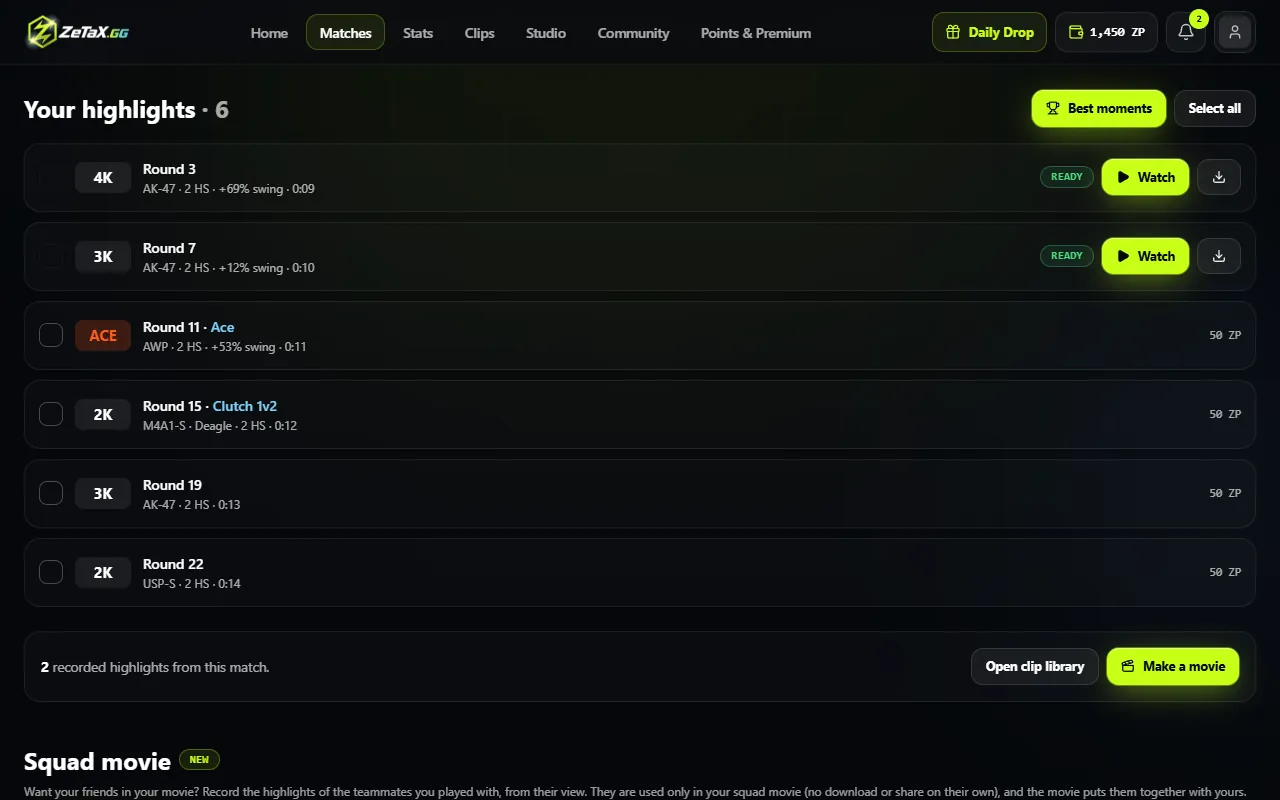
- ZeTaX reads the demo and lists the highlights: aces, 4Ks, clutches and multi-kills.
- Tick the rounds you want and record them. Each one becomes an MP4 clip you can download.
Why not record it yourself?
- No screen recorder, no demo commands and no lost frames on your PC: the recording runs on ZeTaX servers.
- The camera follows your own view with the original game sound.
- Clips are cut from just before the first kill to the last, without menus or the demo UI.
Questions
What does it cost?
A clip costs 50 ZP. New accounts get 500 ZP free when they sign in with Steam.
Which demos work?
CS2 Premier, Competitive and FACEIT demos, and .dem files from your own matches. Very old CS2 demo versions may not play.
What quality is the video?
Full HD at 60 fps with the game sound. Premium can record single clips in 1440p.
Can I turn the whole match into one video?
Record the rounds you want, then put them together in Studio as one movie.